The Add-on comes with a 15 day free trial, so you can try it out for free (no strings attached).
Play around with it and decide if it's for you or not.
To enable the trial, login to your WordPress site and navigate to:
Super Forms > Add-ons
On this page you can start the 15 day trial for the Listings Add-on.
Once the trial is activated, you can navigate to any of your existing forms:
Super Forms > Your forms, or create a new form Super Forms > Create form
Now click on the Listings TAB at the top of the builder page.

Here you will find all the settings and options for the Add-on.
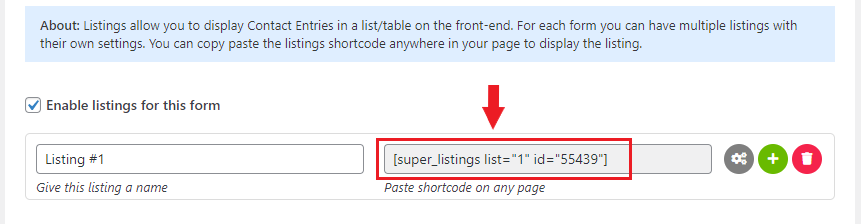
To create your first listing, you can check the option Enable listings for this form.
To edit your listings settings you can click the cogwheel icon as shown below:

All the options will now be displayed, and you are free to adjust them as you see fit.
After you are done with changing the desired settings, you can copy and paste the listings shortcode anywhere on the desired page in your WordPress site.
Tip: you most likely will want to setup a page with a Fullwidth layout (if your theme supports it), this way the most columns can be visible at once (in case you have many defined to be displayed)
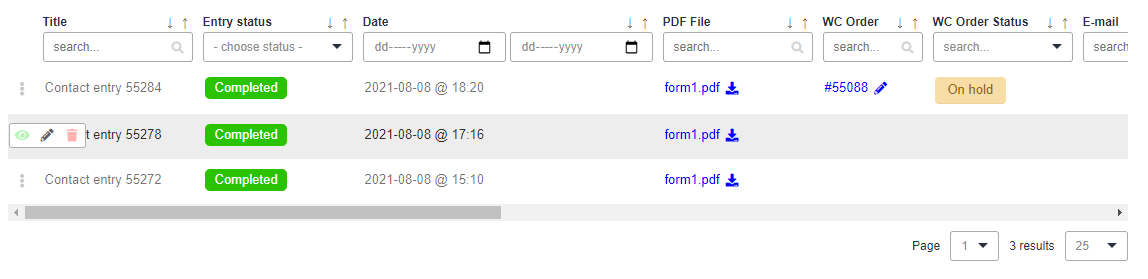
Depending on your settings your listing should be visible (or not) and might look something like this:
Comments
0 comments
Please sign in to leave a comment.